
- Streaming Products
- BD-DVD products
- Useful Articles
- support
Article Editor: Young leaves
Jan 01, 2026
Experience the best music converter now!
Share this article!


"I want to download Amazon Music to my PC for offline listening, but how do I do that?" is a common question online. Many users want to download Amazon Music to their PC for offline listening, but many don't know how to do it. Indeed, downloading Amazon Music directly to your PC can avoid many playback issues and provide a better experience. So, how can you download Amazon Music to your PC?
This article explains in detail how to download songs to your PC using the Amazon Music app. We'll also introduce free software that allows you to bypass Amazon Music's download restrictions and save music to your PC for playback, even if you're a free member. If you want to download Amazon Music to your PC, be sure to read to the end.
Related Posts:
Amazon Music is a popular music streaming service that supports downloading music to your PC. However, there are two conditions that must be met to use this feature. First,Amazon Music" paid membership, and for PC
Now, let's show you how to download music to your PC using the Amazon Music app. Follow the steps below.
step 1,Official Amazon website or app storeDownload and install the Amazon Music app from the app store.
Step 2After launching the Amazon Music app, go to your Amazon accountLog inI will.
Step 3, search for your favorite song in the search field, then click on the right"︙"iconClick
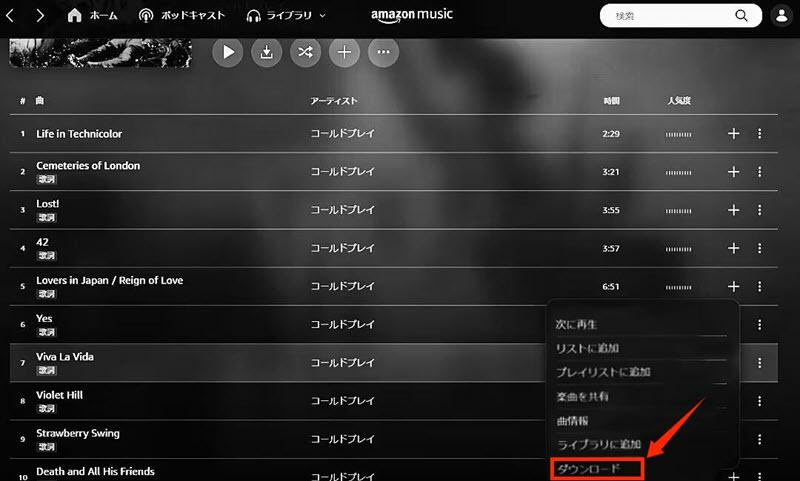
Step 4, click the icon, and in the menu"download"The following option will appear.
Step 5,"download"Click the button to download Amazon Music to your PC using the app.
However, please note that when downloading music to your PC through the Amazon Music app, there are various download restrictions, such as device limit and storage period limit.
Notes on downloading songs to your PC using the Amazon Music app
How can we get around these restrictions? In the next section, we will introduce a professional software that can completely eliminate the official restrictions.StreamByte for MusicWe will introduce how to use "Amazon Music Downloader". The operation is simple, and anyone can easily download and enjoy songs from Amazon Music.
So far, we have explained in detail how to download Amazon Music songs to your PC using the official app, but downloading music using the official function comes with various restrictions, such as device restrictions, membership period restrictions, and internet connection authentication. We have introduced a new app that allows you to download Amazon Music songs to your PC without restrictions, without these official download restrictions.StreamByte for MusicWe would like to introduce you to a specialized music download software called ".
This all-in-one music download and conversion software allows you to download Amazon Music songs to your PC at an astonishing 35x speed. The music you download to your PC with this software is permanently saved, and no continuous internet connection is required.Amazon Music: Free offline playbackYou can. In addition,DRM removal functionThis allows you to freely customize the download location of songs downloaded from Amazon Music to your PC. This not only allows you to freely manage the songs you download to your PC, but also frees you from any playback restrictions, allowing you to enjoy your saved music anytime.
So far, we have explained in detail how to download Amazon Music songs to your PC using the official app, but downloading music using the official function comes with various restrictions, such as device restrictions, membership period restrictions, and internet connection authentication. We have introduced a new app that allows you to download Amazon Music songs to your PC without restrictions, without these official download restrictions.StreamByte for MusicWe would like to introduce you to a specialized music download software called ".
” /]
StreamByte for Music
This is the perfect music converter for those who want to enjoy streaming music with the original sound quality. It supports multiple music platforms and allows you to save music while maintaining high sound quality.
Why we recommend "StreamByte for Music"
So, "StreamByte for MusicWe will show you how to use Amazon Music to download songs to your PC and play them without any restrictions.
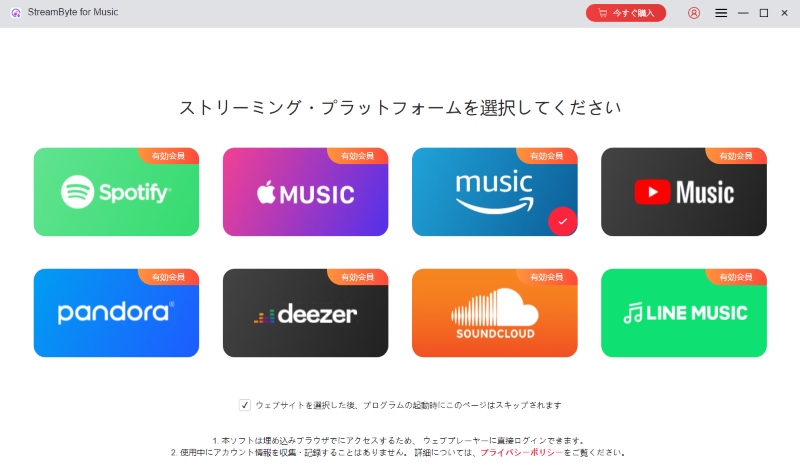
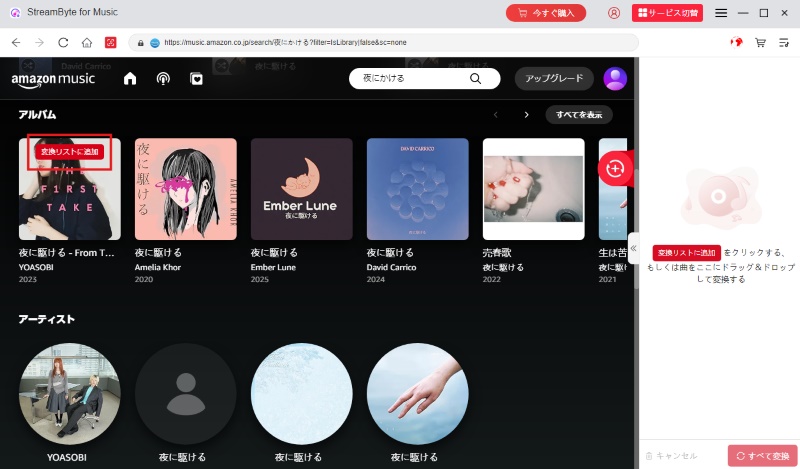
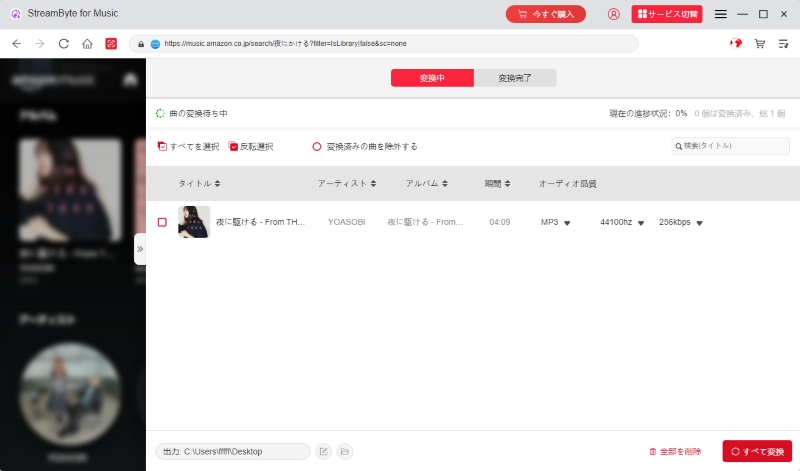
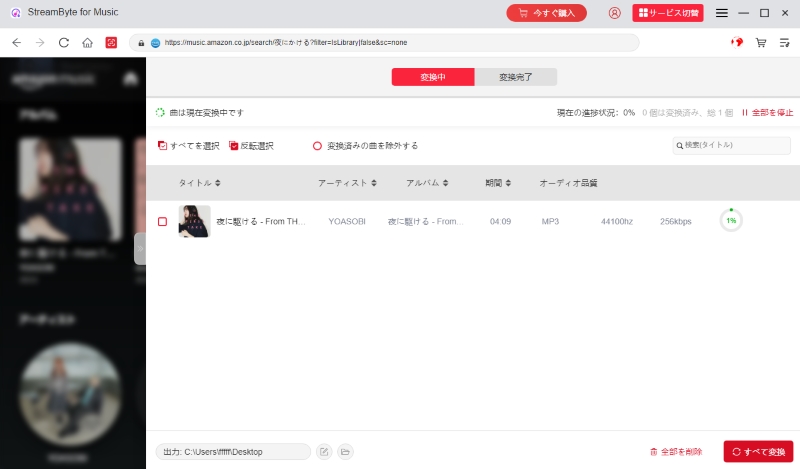
"StreamByte for Music" allows free users to download Amazon Music songs to their PC. There are no tedious download restrictions, so you can enjoy your favorite music without stress.DRM removal functionThis software allows you to convert Amazon Music songs to common formats such as MP3, and you can freely set the download destination. Now you can play the saved music freely on any music player or device, so you no longer have to worry about playback restrictions. If you want to save Amazon Music songs for free and enjoy them freely, be sure to download this software and experience its high functionality.
100% safe and virus free
100% safe and virus free
| method | How to download on PC | StreamByte for Music | Amazon Music app |
| Output Format | MP3, FLAC, WAV, AAC, etc. | Encrypted format (with DRM) | |
| Output Sound Quality | Original high quality | Original high quality | |
| Device Restrictions | Transfer and store downloaded songs on any device | Transfers are not possible, but downloads can be made to up to 10 devices per account. | |
| Supported plans | Amazon Music Free/Prime/Unlimited | Amazon Music Prime/Unlimited | |
| DRM Restrictions | can be | none | |
| Bulk download | Possible | Not possible | |
| Free Download | Possible | Not possible | |
| Offline playback after cancellation | Possible | Not possible |
We've compared two download methods: the specialized software "StreamByte for Music" and the Amazon Music app. Downloading via the Amazon Music app is quick and convenient, but it has many limitations and requires a recurring subscription to play downloaded content offline. On the other hand, "StreamByte for Music" removes DRM protection, allowing you to freely save and play your favorite music on your computer, even with the free plan.
For those who want to use Amazon Music songs in MP3 format,StreamByte for MusicThe best way to download it is via ". Please feel free to download this software and try it out.
100% safe and virus free
100% safe and virus free
If you don't want to install any apps or software, you can also use an online site to download and save Amazon Music songs to your PC.Amazon Music Downloader" is a website that allows you to convert Amazon Music songs, albums, and playlists to MP3. It's easy to use; just copy and paste the URL of your favorite content to save the music.
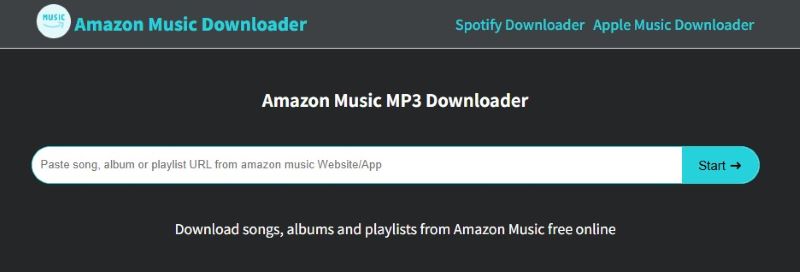
The specific steps to download Amazon Music songs to your PC using "Amazon Music Downloader" are as follows.
step 1Open the Amazon Music web player and copy the URL of the music content you want to download to your computer.
Step 2Go to the "Amazon Music Downloader" site page and paste the URL you copied into the input field.
Step 3Click the "Start" button to begin parsing the URL. After the analysis is complete, select the output format and download.
While "Amazon Music Downloader" may seem convenient at first glance as an MP3 download site specifically for Amazon Music, it actually has many drawbacks. For example, changes to Amazon Music's specifications can frequently cause URL analysis to fail, and downloads can be unstable depending on the network environment. The sound quality of downloaded music files is prone to degradation, making it less than ideal in terms of safety and quality. Furthermore, because it is an online service, there are security risks such as virus infection and privacy violations.
For those who value safety and stability, we recommend the "StreamByte for MusicWe especially recommend using Amazon Music. You can access the software's built-in Amazon Music web player to search for and download music directly. It ensures a stable operating environment and allows you to convert and save music in lossless audio formats like MP3 and AAC. There are no ads, and you don't have to worry about viruses or malware, so even first-time users can use it with confidence.
100% safe and virus free
100% safe and virus free
The communication environment is unstableYour network environment is a key factor in determining whether you can download music to your PC. If your connection is unstable or completely disconnected, you may experience issues such as significantly reduced download speeds, stopped download progress, or complete inability to download. Therefore, if you are unable to download music to your PC using the Amazon Music app, we recommend checking your network connection status.
Non-member periodIf you can't download music to your PC using the Amazon Music app, first check your Amazon Music Unlimited subscription status from the account icon in the upper right corner of the screen. Amazon Music's official download feature is a benefit available only to paid Amazon Music members, so if your subscription has expired, you won't be able to download properly.
Insufficient storage space: To download music to your PC using the Amazon Music app, you need a certain amount of storage space on your local disk. If you don't have enough storage space, you won't be able to download music to your PC. In more serious cases, the Amazon Music app may not function properly.
Device Limit : There is a limit to the number of devices that can be registered for the Amazon Music download function. Up to 10 devices can be registered, but only 3 can be used simultaneously. If the number of registered devices exceeds the limit, or if you attempt to download music on 4 or more devices simultaneously, you may not be able to download music to your PC using the Amazon Music app.
Regional Restrictions: Songs provided by the Amazon Music app are subject to regional restrictions, so the available song library varies by region or country. If a song is not available in your region, you will not be able to download it to your PC via the Amazon Music app.
Music downloaded from Amazon Music is DRM protected, so you need to connect to the internet regularly. If you don't connect to the internet for 15 days, it will expire and you won't be able to play it. If you want to keep the music forever without these restrictions, you can use "StreamByte for MusicYou will need to use dedicated download software such as ".
Where to download and save Amazon Music songsYou can usually check and set this in the "My Music" section. To check the specific save location on your PC, first launch the Amazon Music app and click the account icon in the upper right corner. Then select "Settings" and you can check the save location in the "Download Location" section. Furthermore, you can click "Download Location" to specify the output folder for Amazon Music.
For WindowsBy default, Amazon Music music files are temporarily saved in the "C:\Users\Username\Music\Amazon Music" folder.
For Mac: Typically, they are saved in the "Amazon Music" directory within the "Music" folder.
However, Amazon Music songs downloaded to your computer are encrypted and can only be played using the Amazon Music app. They may also be saved as hidden files, so please enable hidden files in your PC settings if necessary.
Personal use is often considered a gray area in Japan. Generally, removing DRM is often considered illegal from the perspective of copyright protection, but for personal use only, criminal liability is rare. However, legal treatment varies by country and region, so ultimately, decisions must be made in accordance with local laws.
If you save songs using the Amazon Music PC app, the downloaded music is DRM-protected and cannot be transferred to other devices such as smartphones or USB memory sticks or audio players for playback. If you want to transfer songs downloaded on your PC to devices such as an iPhone or Android smartphone, you will need to convert the Amazon Music music to a file format such as MP3.
The music conversion software introduced in this article is "StreamByte for Music" is a useful tool. It removes the DRM protection from Amazon Music, converts it to common formats like MP3 and AAC, and downloads it to your computer. This allows you to freely store the saved music files on any device, including smartphones, USB drives, and CDs.
This article provides detailed instructions on how to download Amazon Music songs to your PC using the official app and free software. Songs downloaded using the PC version of the Amazon Music app are DRM-protected and can only be played within the app. Additionally, once your Amazon Music paid plan expires, you will no longer be able to play downloaded music offline. We also introduced "StreamByte for Music" as a secret trick for downloading Amazon Music songs to your PC without any restrictions.
This software isHigh quality soundAs a dedicated music download software that maintains your subscription, even free members can download Amazon Music songs to their PC. You can download your favorite Amazon Music songs to your PC without Amazon Music's download restrictions or DRM protection. This means you can enjoy your saved Amazon Music songs anytime, anywhere, even after canceling your paid plan.
"StreamByte for Music" offers a 14-day free trial, so if you want to easily download Amazon Music to your PC, feel free to download it and give it a try!
100% safe and virus free
100% safe and virus free
Born in Tokyo. Studied music culture at Tokyo Woman's Christian University, and after graduating, worked in the music distribution and download industry, gaining experience as an editor and writer. Has a deep understanding of a wide range of music genres, from rock, J-POP, classical, and metal, and is familiar with major services such as Spotify, Apple Music, and YouTube Music.
He has written over 300 articles, with a total of 6 million page views. He strives to provide accurate and easy-to-understand information so that readers can enjoy music more conveniently and safely. He currently writes articles for the StreamByte editorial department, focusing on how to use and utilize music download and conversion software.
Read more articles together
Experts in supporting offline listening of streaming music services
Subscribe to StreamByteCopyright © 2026 StreamByte. All rights reserved.



Get the latest news, product upgrades, information, guides, discounts and more about StreamByte.
Please enter a valid email address.





 English
  Japanese
  Chinese (traditional)
  German