
- Streaming Products
- BD-DVD products
- Useful Articles
- support
Article Editor: Young leaves
Jan 01, 2026
Experience the best music converter now!
Share this article!


Apple Music is a popular music streaming service worldwide, offering unlimited access to a wide range of music content on its app. Responding to user requests for offline playback, such as "I want to listen to Apple Music on airplanes without Wi-Fi" and "I want to save on data charges," the app offers a feature for downloading songs. However, downloaded songs are DRM-protected, meaning they can only be played offline within the app, and cannot be played after canceling the subscription.
In this article, we'll explain in detail how to play Apple Music offline, as well as what to do if you can't play it and what to be careful of. We'll also introduce some tricks to play songs offline even after canceling your Apple Music subscription. If you want to enjoy Apple Music more freely, be sure to read to the end.
Related Posts:
Offline playback of Apple Music means downloading songs using the Apple Music app and playing them offline without connecting to a network such as data communication or Wi-Fi.
Save on communication costs: If you don't have a Wi-Fi connection, streaming Apple Music songs will consume data and can cost you a lot of money over long periods of time. By playing music offline, you can enjoy music comfortably without worrying about data usage.
Prevent interruptions to your music playback: When streaming Apple Music, playback may be interrupted in places with unstable network environments, such as on a train. By downloading Apple Music songs and playing them offline, you can enjoy smooth music listening without being affected by network conditions.
Use in an environment where no internet connection is required: Even if you need to use airplane mode, such as when boarding an airplane, you can play your favorite songs without an internet connection by downloading them to your smartphone in advance.
Offline playback with the Apple Music app is easy and convenient, but please note the following points before using it.
Temporary storage: Downloaded Apple Music songs can only be played while your subscription is active. If you cancel your subscription, you will no longer be able to play downloaded songs.
Playback device and app restrictions: Because Apple Music songs are DRM protected, they can only be played within the official Apple Music app and cannot be transferred or played on other media players or devices.
Possibility of distribution termination: If a song's distribution license expires and distribution on Apple Music ends, it will be grayed out in your library and will no longer be playable, even if you download it.
Restrictions on use: Downloaded music can only be played within the app and cannot be converted or edited.
If you want to download Apple Music songs and play them offline more freely, consider using StreamByte for Music, a professional music download software with DRM removal functionality.
In the following sections, we'll explain in detail how to play Apple Music offline using the Apple Music app, which requires a recurring subscription, and how to permanently save Apple Music songs in MP3 or other formats so they can be played even after canceling your subscription. Choose the method that best suits your needs and subscription situation. We hope this article was helpful.
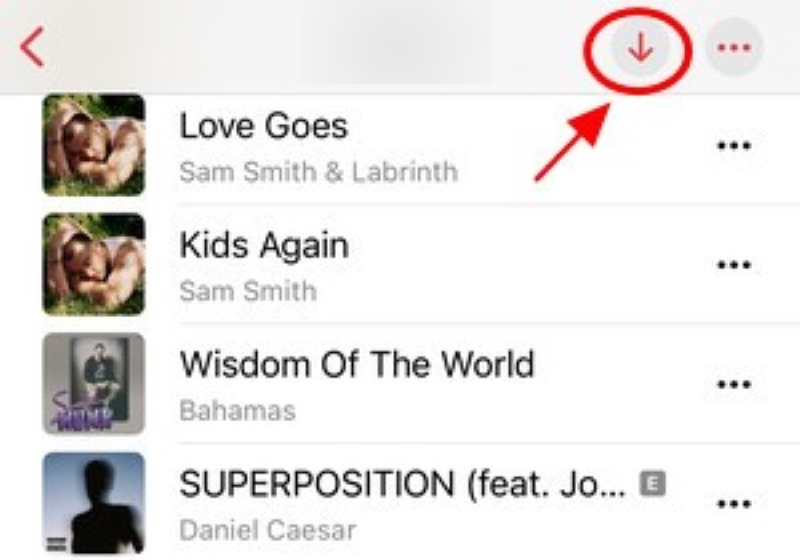
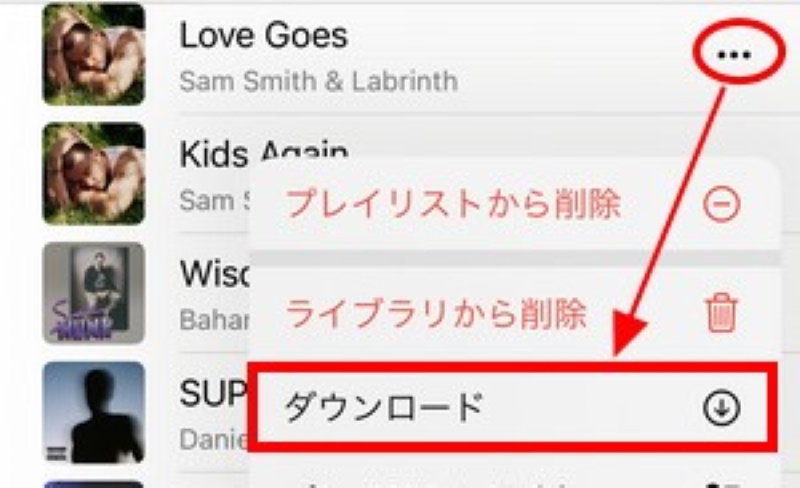
If you subscribe to Apple Music, you can download music and play it offline. Below are the specific steps to play songs offline using the Apple Music app on your smartphone or computer.
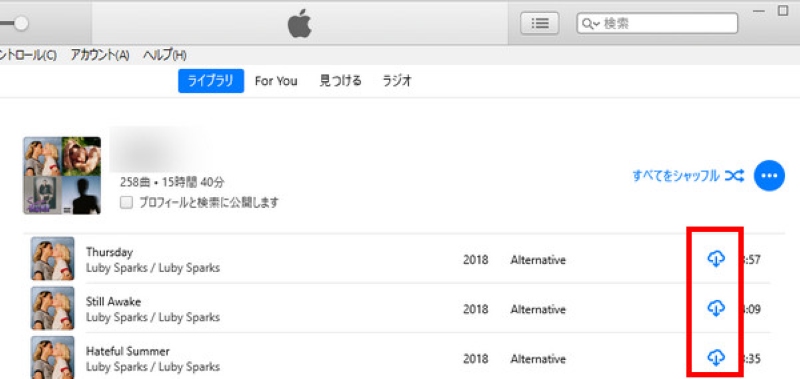
You can download songs to your computer using the Apple Music app or iTunes. Below we'll show you how to download songs to your Mac or Windows computer using Apple Music's official features.
Apple Music's official offline playback feature has various limitations. While it's easy to play songs offline using the Apple Music app, downloaded songs are DRM-protected, meaning they are only temporarily stored within the app and cannot be played on other devices or players, cannot be edited, and are subject to limitations on their use beyond playback. Furthermore, if you cancel your subscription, saved Apple Music songs will no longer be available for offline playback. Furthermore, if a song is no longer available on Apple Music, downloaded content will also be grayed out and unplayable.
If you want to enjoy Apple Music's official offline playback feature freely without restrictions on playback location, usage, storage period, etc., please see below.Apple Music to MP3 Converter"StreamByte for MusicPlease consider using ".
"StreamByte for Music" allows you to listen to songs from Apple Music.Remove DRM protectionYou can then convert the converted Apple Music songs to common formats such as MP3, M4A, and FLAC and download them to your computer. The converted Apple Music songs can be permanently saved locally with their original sound quality. The Apple Music songs downloaded in this way are DRM-free, so you can transfer them to any device, such as a smartphone or tablet, or to an external music player for offline playback, and continue enjoying them even after canceling your subscription. In addition, downloaded songs can be used without restrictions, such as as background music for videos, or on Android devices.Set as iPhone alarm soundYou can do this.
In addition, this software has a built-in web player that supports Apple Music, and it also has functions for batch downloading and editing/retaining ID3 tag information, allowing for efficient music management. StreamByte for Music offers a free trial of all its features, so please download it and take advantage of it.
StreamByte for Music
This is the perfect music converter for those who want to enjoy streaming music with the original sound quality. It supports multiple music platforms and allows you to save music while maintaining high sound quality.
Key Features and Attractive Features of StreamByte for Music
Steps to download Apple Music songs for offline playback using StreamByte for Music
Here we will explain in detail how to use "StreamByte for Music" to save your favorite Apple Music songs in DRM-free formats such as MP3 and play them offline permanently.
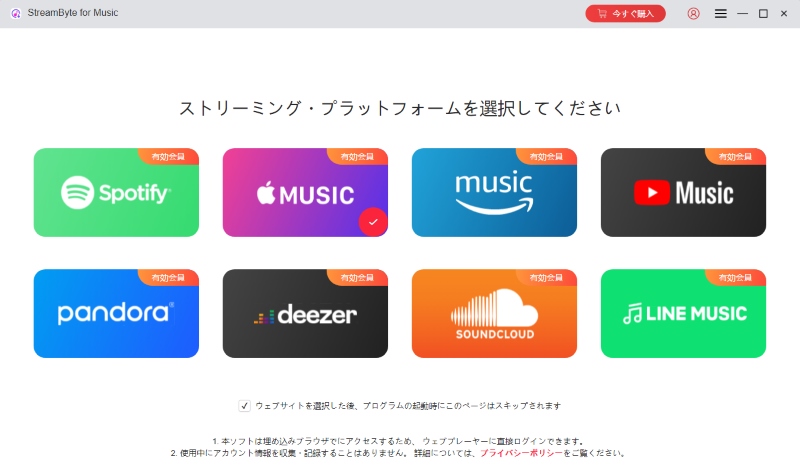
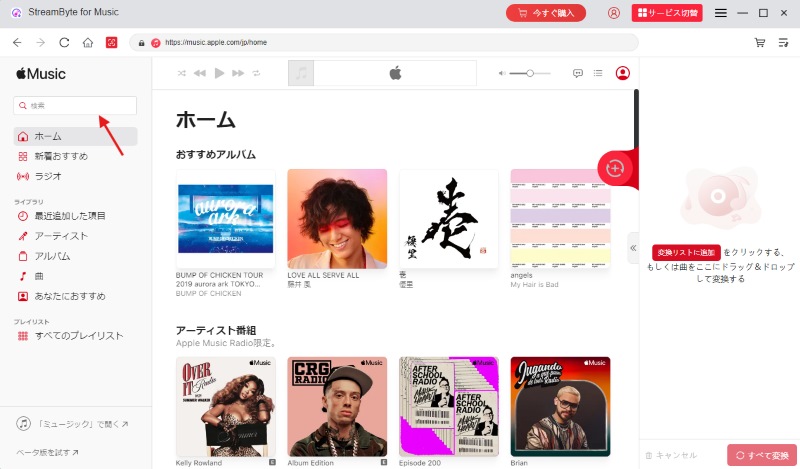
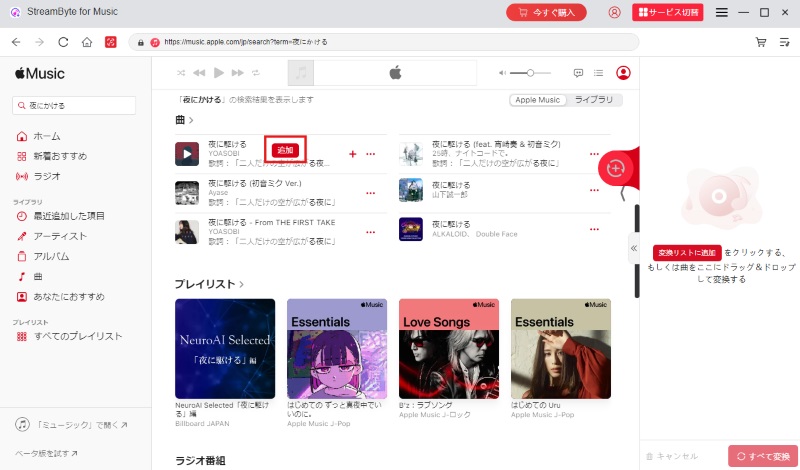
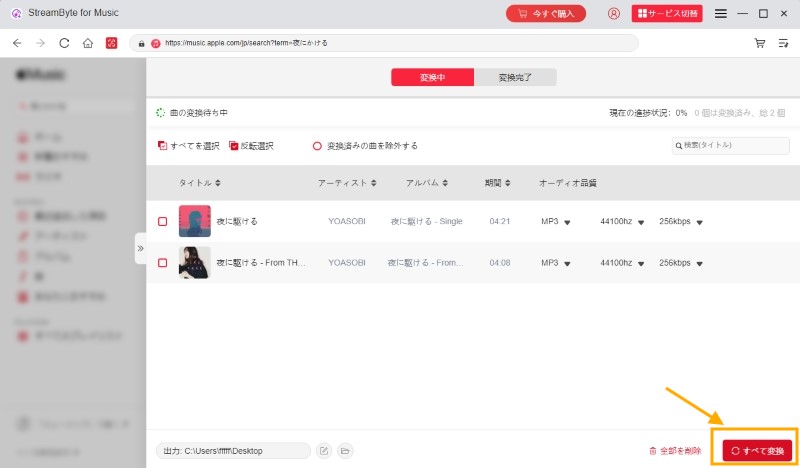
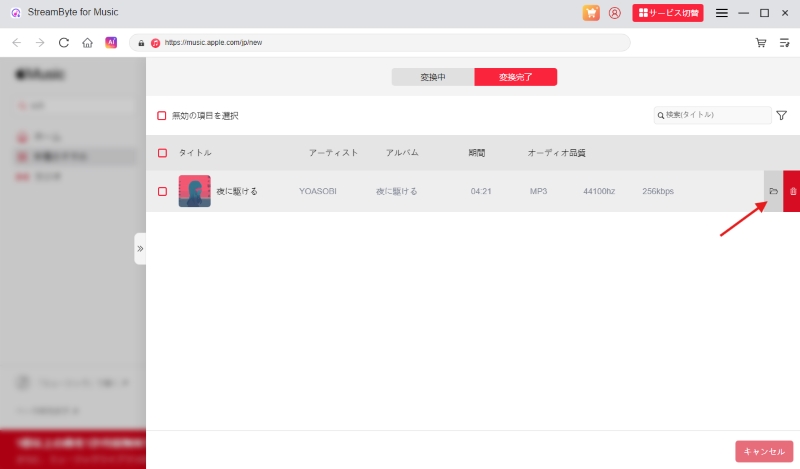
Above, "StreamByte for Music"Convert Apple Music songs to MP3We've introduced how to download and play music offline. This software allows you to easily remove DRM protection from Apple Music and permanently save it locally as a universal audio file. Saved Apple Music music has no playback restrictions and can be played offline anytime, anywhere, regardless of whether you have a subscription. StreamByte for Music offers a free trial, so please give it a try.
100% safe and virus free
100% safe and virus free
DRM Removal: Apple Music's official download function cannot remove DRM protection, so downloaded songs have playback restrictions. "StreamByte for Music" can remove DRM from Apple Music songs and convert them to common formats such as MP3 and AAC, allowing you to play downloaded songs offline without restrictions.
Free offline playback: A paid subscription is required to use the offline playback feature of the Apple Music app. Apple Music songs downloaded with "StreamByte for Music" are stored locally, so even if youCancel Apple MusicYou can play it offline for free.
Device/Player Restrictions: Songs downloaded from Apple Music are DRM-protected and can only be played within the official app. Apple Music files converted with "StreamByte for Music" are DRM-free, so they can be freely transferred between devices and played on external players.
If you can't play Apple Music offline, the following may be the cause.
The downloaded music file is corrupted
I canceled my paid Apple Music subscription.
The iCloud Music Library feature is turned off on your iPhone or Mac.
There is not enough free space on the device
The Apple Music app is outdated
If you can't listen to downloaded songs offline, try the following solutions.
Redownload the song: Download the song again in a stable network environment (especially Wi-Fi).
Check your subscription status: Check whether you have a paid Apple Music subscription and whether it is still valid. Offline playback on the official app requires a recurring subscription.
Free up space: Delete unnecessary data such as photos and videos, and uninstall unused apps to free up space on your device.
Update the app to the latest version: Updating your Apple Music app to the latest version may fix bugs and glitches and resolve offline playback issues.
Yes, offline playback is possible even during the Apple Music free trial period. During the free trial period, you can use all the features, including unlimited music listening, just like a paid member. Please note that once the free trial period ends, downloaded Apple Music songs will no longer be playable. If you want to continue offline playback after the free trial period ends, you will need to purchase a subscription.
Compared to Apple Music's official offline playback feature, there are several advantages to permanently saving songs locally for offline playback. First, locally saved Apple Music songs are DRM-free, meaning you're not restricted to offline playback on any device or player, allowing you to freely enjoy downloaded music anytime, anywhere. Also, while the official offline playback feature is only available to paid subscribers, permanently saved Apple Music songs can be played offline for free without the need for a continuing subscription.
If you download Apple Music songs in advance, you can listen to them smoothly even when you're not connected to a network, such as on a plane or train, without using up data. However, if you use Apple Music over mobile data, syncing your library may consume data. If you want to save data, we recommend turning off mobile data in your device's settings and playing songs in a completely offline environment.
Although the Apple Music app has offline functionality, it has some drawbacks, such as the need to purchase a subscription, device restrictions, usage restrictions, and storage time limits. To avoid these limitations, you need to remove DRM from Apple Music songs and store them locally in advance.
"StreamByte for Music" can be used to remove DRM protection,Download Apple Music songs to your computer- Permanent storage is possible. Saved Apple Music songs can be played offline on any device or player without device restrictions. What's more, offline playback can be continued even after canceling your subscription. If you're having trouble with the limitations of Apple Music's official features, download "StreamByte for Music" for free now and try out the unlimited offline playback feature.
100% safe and virus free
100% safe and virus free
Born in Tokyo. Studied music culture at Tokyo Woman's Christian University, and after graduating, worked in the music distribution and download industry, gaining experience as an editor and writer. Has a deep understanding of a wide range of music genres, from rock, J-POP, classical, and metal, and is familiar with major services such as Spotify, Apple Music, and YouTube Music.
He has written over 300 articles, with a total of 6 million page views. He strives to provide accurate and easy-to-understand information so that readers can enjoy music more conveniently and safely. He currently writes articles for the StreamByte editorial department, focusing on how to use and utilize music download and conversion software.
Read more articles together

Experts in supporting offline listening of streaming music services
Subscribe to StreamByteCopyright © 2026 StreamByte. All rights reserved.



Get the latest news, product upgrades, information, guides, discounts and more about StreamByte.
Please enter a valid email address.





 English
  Japanese
  Chinese (traditional)
  German