
- Streaming Products
- BD-DVD products
- Useful Articles
- support
Article Editor: Young leaves
Nov 27, 2025
Experience the best music converter now!
Share this article!


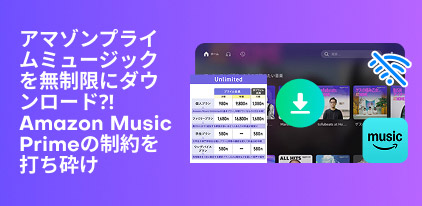
The official Amazon Music app offers offline playback, allowing you to download songs and play them without consuming your data. However, this feature is only available to Prime/Unlimited members, and there are some playback restrictions.
In this article, we'll show you how to play Amazon Music offline, as well as how to freely download your favorite music and listen to it offline forever. If you follow this guide, you can easily enjoy Amazon Music songs without using up gigabytes, so please read to the end.
Related Posts:
Amazon Music offers over 100 million music titles and offers offline playback to meet the needs of those who want to save data, listen to music while in airplane mode, or play music in a wireless environment. Whether you can play music offline on Amazon Music depends on your plan.
Amazon Music offers three main plans: "Amazon Music Free," "Amazon Music Prime," and "Amazon Music Unlimited." The table below summarizes the differences in features for each plan.
| Amazon Music Free | Amazon Music Prime | Amazon Music Unlimited | |
| advertisement | can be | none | none |
| Offline playback | ✕ | Only some playlists are available | 〇 |
| Skip Limit | Up to six times per hour | Up to six times per hour Some playlists are unlimited |
none |
| Lyrics display | 〇 | 〇 | 〇 |
| Spatial Audio | ✕ | ✕ | 〇 |
| Usage fee | free | Included in Amazon Prime membership fee (no additional cost) | Monthly fee required (varies depending on plan) |
From the table above, we can see that you need to subscribe to a paid plan to use Amazon Music's offline playback feature. Also, while Amazon Music Unlimited allows you to freely download songs, albums, and playlists for offline playback, Prime only supports "selective playlists where you can play selected songs."
On the other hand, if you use the offline playback feature with Amazon Music Prime/Unlimited, the following restrictions apply:
While it's convenient to play songs offline using the official Amazon Music app, there's a limitation: since the music data is only stored temporarily, you won't be able to listen to it offline after canceling your subscription. If you want to download Amazon Music songs for offline playback permanently, we highly recommend using the third-party music conversion software "StreamByte for Music."
100% safe and virus free
100% safe and virus free
Here we will explain the steps to download music from Amazon Music Prime and Unlimited and play it offline.
If you are using Amazon Music Prime, you can only download and play offline "selected playlists where you can choose songs to play."
step 1Open the Amazon Music app and select "Curated Playlists" from the home screen.
Step 2Tap the playlist you want to play offline, then tap the download button and the playlist will be downloaded automatically.
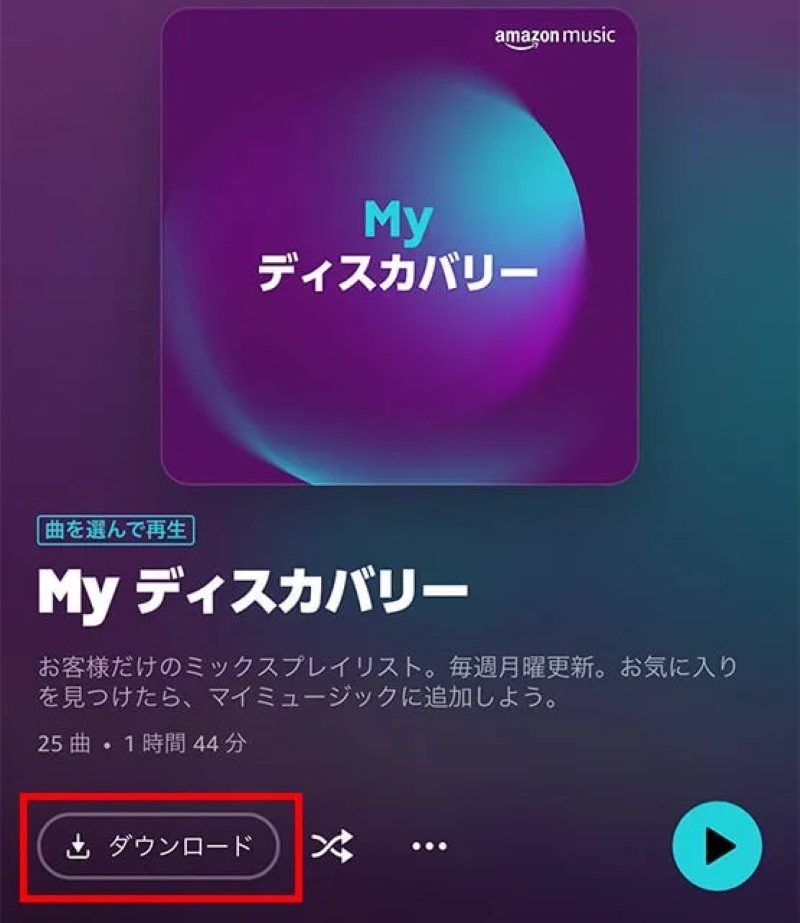
Step 3You can access your recently downloaded music content for offline playback by opening "Download History" under the "Library" tab.
Amazon Music Unlimited lets you download songs, albums, and playlists for offline listening, and the Unlimited plan lets you download music in standard, HD, Ultra, or spatial audio formats.
step 1Run the Amazon Music app, tap the "..." button next to the song title you want to download, and select "Download."
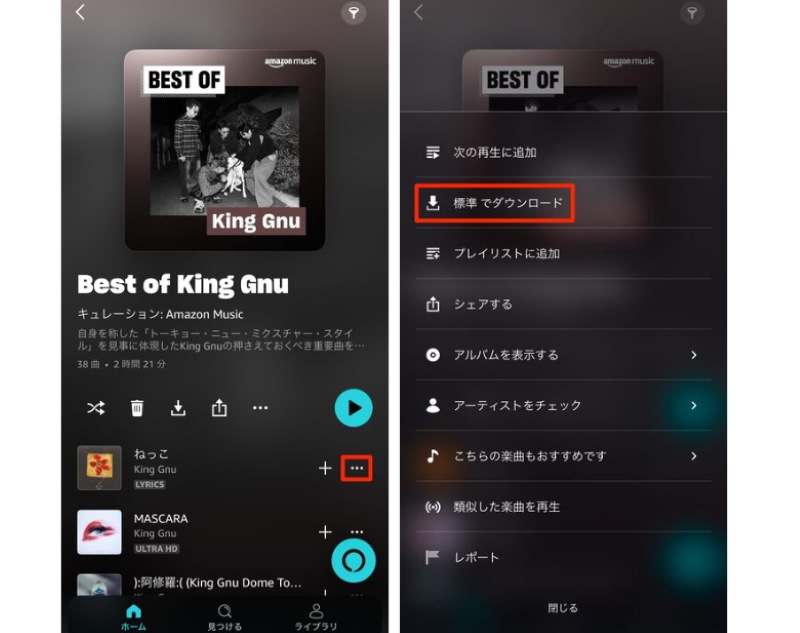
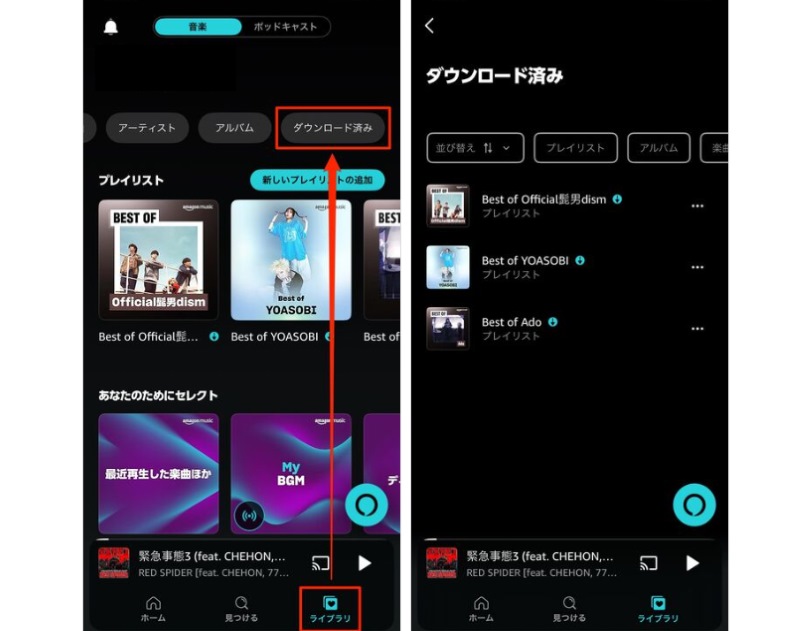
Step 2The downloaded songs will be automatically added to your library. Open the "Library" tab and find your favorite Amazon Music songs in the "Downloaded" section to play them offline.
If you want to play music offline using the Amazon Music app, you will need to subscribe to a paid plan. Furthermore, Amazon Music's official offline playback feature has various restrictions, such as playback limits, device restrictions, and expiration dates. In particular, Amazon Music Prime users can only download and enjoy "selective playlists" offline. To avoid these restrictions, you can use professional music conversion software, "StreamByte for Music" is recommended.
If you use "StreamByte for Music", even free members can enjoy Amazon MusicRemove DRM protectionand convert it to a common format such as MP3/WAV/AAC/FLACYou can download it to your computer. DownloadDownloaded Amazon Music songs can be freely transferred to devices like smartphones and tablets, played on other music players, and listened to offline with both paid and free plans. You can download multiple songs at once at up to 320kbps in high quality and 35x faster speeds. The built-in Amazon Music-compatible web player ensures efficient music downloads. "StreamByte for Music" offers a free trial of all its features, so please download and try it out.
StreamByte for Music
This is the perfect music converter for those who want to enjoy streaming music with the original sound quality. It supports multiple music platforms and allows you to save music while maintaining high sound quality.
Main features of StreamByte for Music and why we recommend it
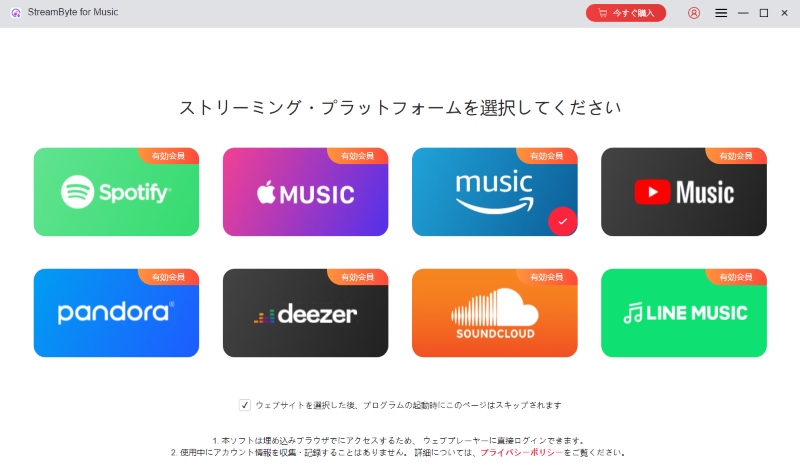
step 1After launching "StreamByte for Music" on your computer and logging in, you will be taken to the main screen, where popular music streaming services such as Amazon Music, Spotify, YouTube Music, and Apple Music will be displayed. Select Amazon Music from the list.
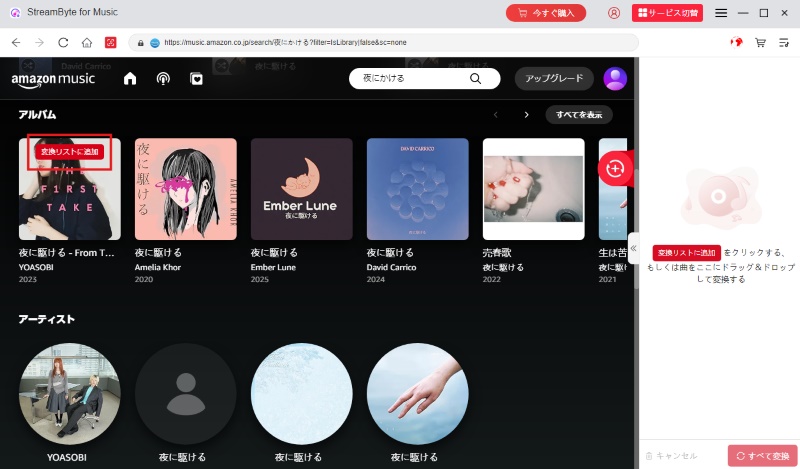
Step 2Log in to Amazon Music with your account, search for the music you want to play offline, and click the "Add to Conversion List" button. If you want to download multiple songs, albums, or playlists at once, you can add them all to the conversion list.
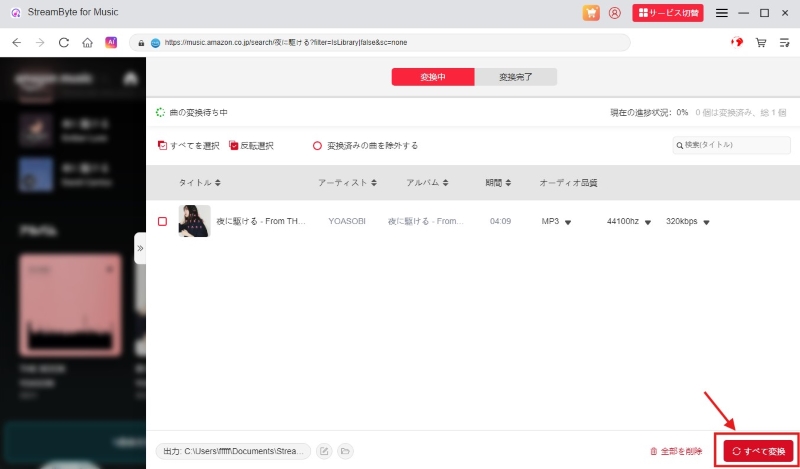
Step 3Next, open the conversion list screen and set the output format, bitrate, and save location for the songs you want to play offline. Once you've done that, click the "Convert All" button at the bottom right to start downloading Amazon Music.
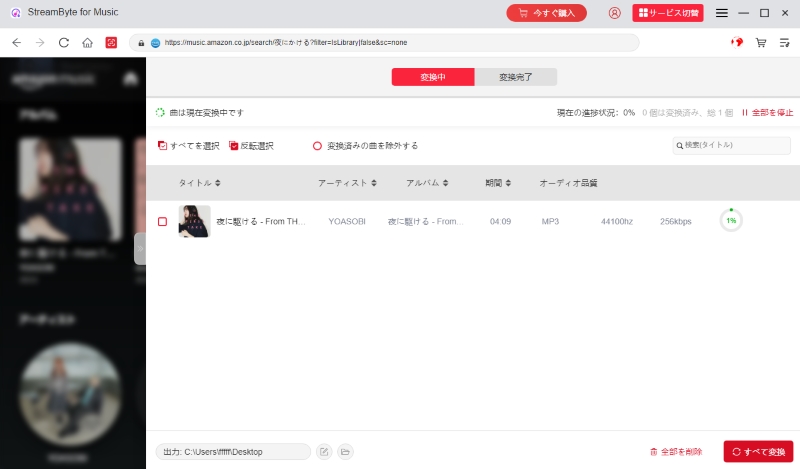
Step 4You can check the progress of your Amazon Music download on the conversion screen, and the downloaded songs will be displayed under the "Conversion Completed" tab.
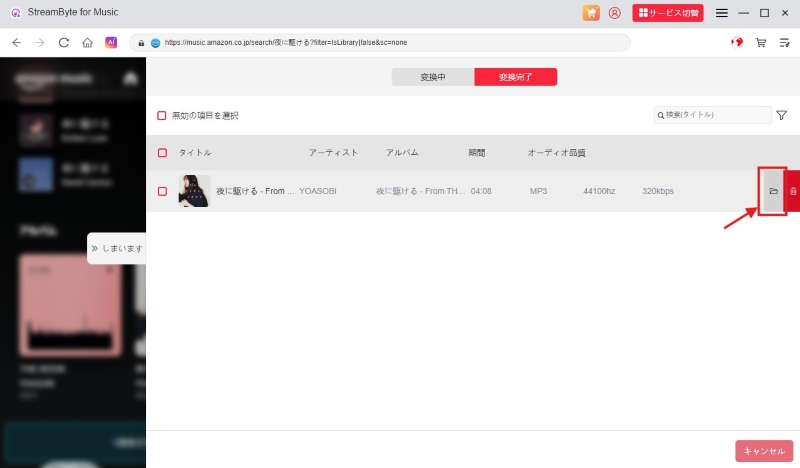
Step 5Click the folder icon next to the downloaded songs to open the output folder and play the downloaded Amazon Music songs offline without any restrictions.
"StreamByte for MusicBy using ", you canConvert Amazon Music songs to MP3 formatDownload songs from Amazon Music directly. Because the DRM protection is removed, you can play them freely on other devices and players, and you can continue listening to them offline even if you cancel your paid membership. This software also supports downloading music from popular music streaming services, including YouTube Music, Spotify, and Deezer. Download StreamByte for Music for free now and experience unlimited offline playback of Amazon Music.
100% safe and virus free
100% safe and virus free
| function | StreamByte for Music | Amazon Music app |
| Free Music Downloads | 〇 | ✕ |
| Download sound quality | Lossless Sound Quality | Lossless Sound Quality |
| Offline playback | No limit | Plays only within the app |
| Device Restrictions | No limit | Up to 10 devices per account |
| Output Format | Common formats such as MP3, WAV, AAC, and FLAC | Encrypted format with DRM protection |
| Local storage | Can be saved on PC, smartphone, or external storage | Temporarily saved within the app |
| Offline playback after cancellation | 〇 | ✕ |
When using offline playback on Amazon Music, you may encounter issues such as "I downloaded music but can't listen to it offline" or "I can't find the offline playback mode." These issues are often caused by plan restrictions, network connection issues, or device malfunctions. Below we'll introduce the causes and solutions for Amazon Music offline playback issues, so please try them out.
Amazon Music offline playback feature has been restricted
To play music offline on Amazon Music, you need to subscribe to a paid plan. With Amazon Music Prime, only some playlists can be played offline. Also, even if you cancel your Amazon Music subscription, you won't be able to play songs you've already downloaded offline, so please check your subscription status regularly.
To play Amazon Music offline without limits,StreamByte for MusicThere is a way to save songs locally using ", whether you have a free or paid plan.
The Amazon Music app is out of date
If your Amazon Music app is outdated, it may not work properly and may cause errors. In this case, updating the app to the latest version may solve the problem of Amazon Music not working offline.
Amazon Music official server issue
There may be a problem with the official Amazon Music server that prevents offline playback on the app. In this case, all you can do is wait for Amazon Music to be fixed.
In this case,Amazon Music Customer ServicePlease don't hesitate to contact us.
Your device is not compatible with the app
If your computer, smartphone, tablet, or other device's operating system is outdated, it may not be compatible with the latest version of the Amazon Music app. This can result in issues with playback or downloads. If this happens, please update your device's operating system to the latest version.
With Amazon Music Unlimited, you can download all songs available for offline listening, and you can download an unlimited number of songs. On the other hand, with Amazon Music Prime, you can only download songs in select playlists, and you cannot download any other songs.
If you download songs using the Amazon Music PC app, they are DRM-protected and cannot be transferred to your smartphone. To play Amazon Music offline on your smartphone, you must install the app and sign up for a paid membership. Note that you can only play offline on up to 10 devices per account, and the offline playback feature will be unavailable after your paid plan expires.
If you want to listen to Amazon Music offline without restrictions on playback devices,StreamByte for MusicWe recommend using "Amazon Music". This software removes the DRM protection from Amazon Music and allows you to permanently save songs locally in a universal format without the need for a paid membership. You can transfer the saved songs to your smartphone or tablet, or save them to an SD card.Transfer it to a USB memoryYou are free to do what you want.
100% safe and virus free
100% safe and virus free
If you experience high data usage when playing songs downloaded from Amazon Music, first check that the songs were downloaded correctly. Downloaded songs are stored as DRM-protected cache files, so a small amount of data will be consumed when you launch the app while connected to a network. Additionally, if the high-quality playback setting is enabled, songs downloaded in standard quality may automatically switch to high-quality streaming playback when played.
Additionally, if you are using an iOS or Android device, there is a feature that automatically downloads a playlist of recently played songs.
To prevent unnecessary data usage, please refer to the following methods:
• Turn on the setting to stream only when connected to Wi-Fi in the app settings.
• Download songs in the best quality
• Download only when connected to Wi-Fi in settings
• Turn off "Auto-download curated playlists to choose songs to play" in Settings
The main reasons why songs for offline playback disappear from Amazon Music are due to an expired membership, an app malfunction, a change in specifications, etc. To resolve the issue, try the following solutions.
• Check your paid plan subscription status
• Restart the app and your device
• Update your version of the Amazon Music app
• Update My Music in the app settings
• Contact Amazon Music's support team
This article explains in detail how to download music from Amazon Music and play it offline. However, the official offline playback feature requires a subscription to Amazon Music Prime/Unlimited, and downloaded songs are DRM-protected, so there are various restrictions such as playback restrictions, device restrictions, and expiration dates. To avoid these restrictions, you can use specialized music download software " StreamByte for Music" is also an option.
With "StreamByte for Music," you can remove DRM protection from Amazon Music, convert it to common formats like MP3, and download it quickly at up to 320kbps in high quality. Downloaded songs can be played offline on any device, including computers, smartphones, and music players. The software has a built-in Amazon Music-compatible web player, so you can directly convert and save music to audio file format without installing an app or subscribing to a paid plan. This is an excellent tool for those who want to enjoy music freely without worrying about Amazon Music's offline playback restrictions. A free trial version is available for "StreamByte for Music," so please give it a try.
100% safe and virus free
100% safe and virus free
Born in Tokyo. Studied music culture at Tokyo Woman's Christian University, and after graduating, worked in the music distribution and download industry, gaining experience as an editor and writer. Has a deep understanding of a wide range of music genres, from rock, J-POP, classical, and metal, and is familiar with major services such as Spotify, Apple Music, and YouTube Music.
He has written over 300 articles, with a total of 6 million page views. He strives to provide accurate and easy-to-understand information so that readers can enjoy music more conveniently and safely. He currently writes articles for the StreamByte editorial department, focusing on how to use and utilize music download and conversion software.
Experts in supporting offline listening of streaming music services
Subscribe to StreamByteCopyright © 2026 StreamByte. All rights reserved.



Get the latest news, product upgrades, information, guides, discounts and more about StreamByte.
Please enter a valid email address.





 English
  Japanese
  Chinese (traditional)
  German