
- Streaming Products
- BD-DVD products
- Useful Articles
- support
Article Editor: Young leaves
Jan 01, 2026
Experience the best music converter now!
Share this article!


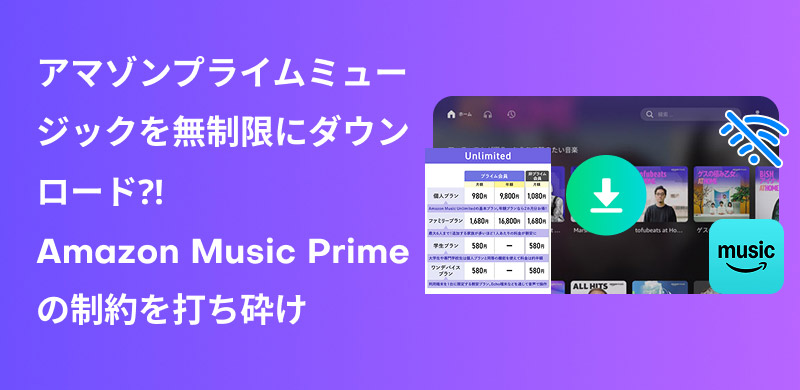
Amazon Music Prime is a music streaming service offered by Amazon for Prime members. Prime members can listen to all music at no additional cost and also enjoy the ability to download songs for offline playback. However, due to a specification change in November 2022, it is no longer possible to freely download any song or playlist within the app. Currently, Amazon Music Prime, available as a Prime membership benefit, only allows downloading of "selected playlists where you can select songs to play."
In this article, we'll explain how to download carefully selected playlists from Amazon Prime Music, as well as how to download and save all songs from Amazon Music Prime without any restrictions. Whether you're a Prime member or a free member, you can easily save music, so be sure to read to the end.
Related Posts:
Amazon Prime Music is a music streaming service for Prime members provided by Amazon. Amazon Prime members can listen to over 100 million songs and podcasts at no additional charge, and can use features such as shuffle playback, song downloads, and offline playback.
Due to a specification change in November 2022, Amazon Music Prime no longer allows you to freely download any song you want. As a Prime membership benefit, you can download "playlists that allow you to select and play songs" and play them offline. If you want to download other individual songs, you will need to purchase them separately. Also, since the offline playback feature is only available to paid members, if you cancel your Prime membership, you will no longer be able to listen to songs you have already downloaded offline.
Therefore, in this article, we will introduce two ways to download music from Amazon Prime Music.
Method 1,Download the official app: Only carefully selected playlists, offline playback is not possible after cancellation
Method 2,Use professional music download software: No limit, permanent storage
The following section will explain each method in detail.
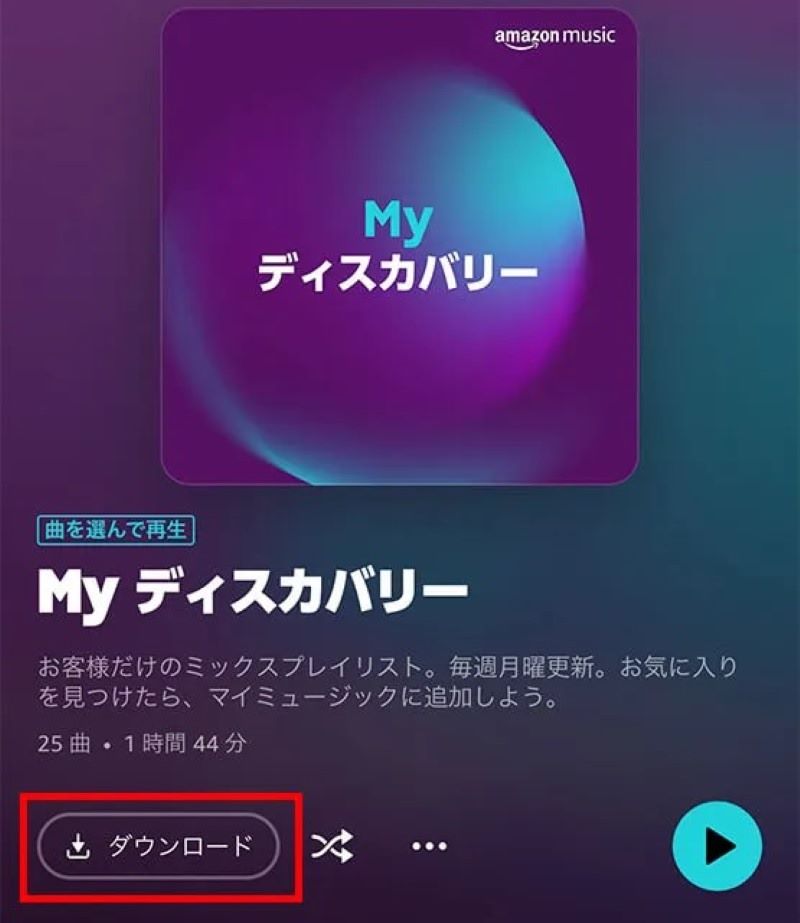
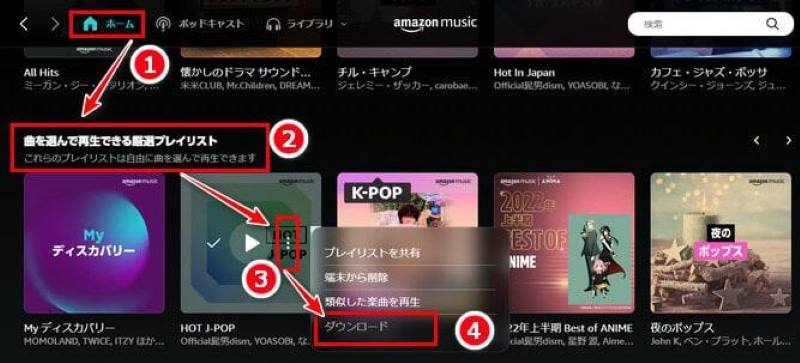
Here we will introduce the steps to download carefully selected playlists using the Amazon Prime Music smartphone app.
Tips: How to Play Amazon Prime Music Offline
As mentioned above, there are some restrictions on downloading music from the Amazon Prime Music app. For example, only certain playlists can be downloaded, offline playback is not available after cancellation, and music cannot be transferred to other devices. In addition to the official download method, you can also use professional Amazon Music conversion software to bypass these restrictions and download Amazon Prime Music songs.
"StreamByte for Music" is music conversion software that converts Amazon Music Prime songs to popular formats such as MP3/AAC/WAV/FLAC and allows you to download them to your Mac or Windows computer quickly and with high sound quality. With this software, you can select from all songs, albums, and playlists, not just Amazon Music's "select playlists where you can choose songs to play."Download your favorite music even with the free planYou can save the music files permanently byDRM protection removedSince it is a paid service, you can enjoy it offline even after canceling your membership, and you can also transfer it to various devices such as smartphones and tablets for playback. "StreamByte for Music" also offers a free trial version, so please download it and take advantage of it.
StreamByte for Music
This is the perfect music converter for those who want to enjoy streaming music with the original sound quality. It supports multiple music platforms and allows you to save music while maintaining high sound quality.
Main features and advantages of StreamByte for Music
Next, we'll show you how to use "StreamByte for Music" to download and play Amazon Prime Music songs. The process is exactly the same for both Windows and Mac, so we'll use a Windows computer as an example.
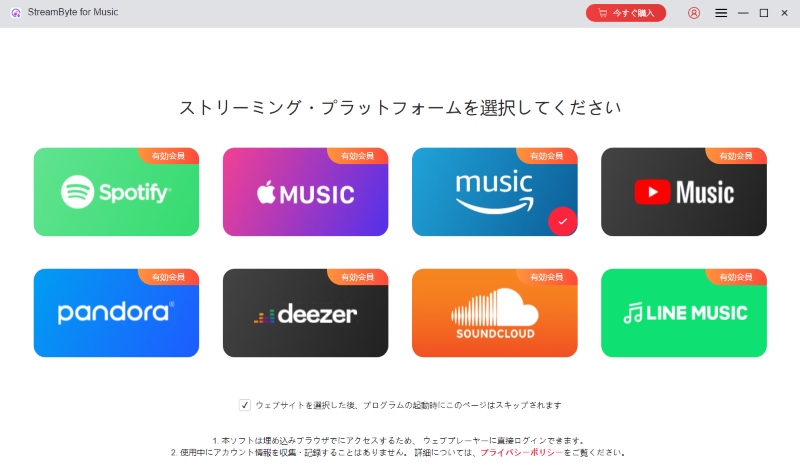
step 1Download and install "StreamByte for Music" on your Mac or Windows PC. Launch the software, log in, and go to the main interface. Click on the built-in Amazon Music web player.
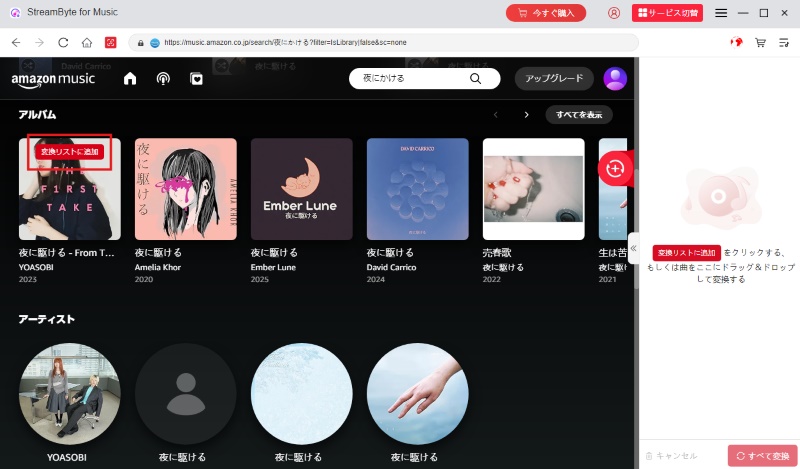
Step 2Sign in to your Amazon account. Search for the music you want to download, whether you're using the free plan or Prime Music plan, and click the red Add button to add it to your conversion list.
Tips:This software supports batch download function, so you can add multiple songs, albums, and playlists to the conversion list at once.
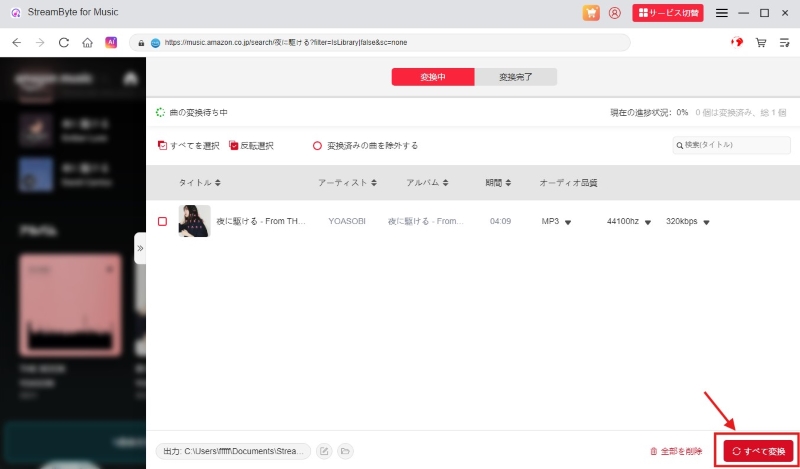
Step 3Once the addition is complete, open the conversion list screen on the right and adjust the output format and save location of the Amazon Music Prime songs. Then click "Convert All" at the bottom right to download all the songs in the conversion list to your computer at once.
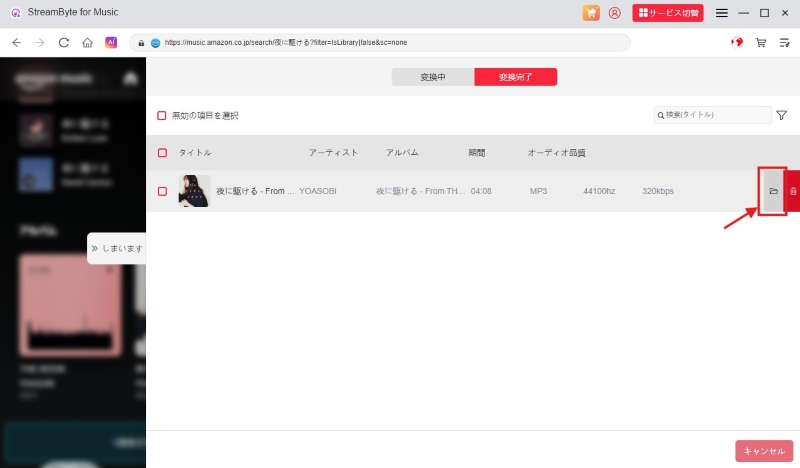
Step 4In the "Converted" tab, you will see a list of downloaded Amazon Music songs. Click the folder icon next to the song name to view the music files saved on your PC for offline playback.
Follow the steps above toStreamByte for Music" is easy to use.Download Amazon Music songs in MP3 and other formatsYou can download and save the songs. You can transfer the downloaded songs to any device, such as your smartphone, and play them on any music player or app. These songs are DRM-free, so they are permanently saved locally and can be played offline even if you cancel your Amazon Prime subscription. If you want to download any song from Amazon Prime Music and play it freely, try downloading "StreamByte for Music" for free now.
100% safe and virus free
100% safe and virus free
The following comparison table compares the features of "StreamByte for Music" for Amazon Music and the official Amazon Music Prime feature, which may be helpful for those unsure which option to choose.
| item | StreamByte for Music | Amazon Music Prime |
| Supported plans | Fully compatible with Amazon Music Free/Prime/Unlimited | Amazon Music Prime |
| Download target | All songs available on Amazon Music | Selective playlists for playing selected songs |
| Output Format | General formats such as MP3/MAV/AAC | Encrypted format with DRM protection |
| Offline playback restrictions | Unlimited, forever playable | Can only be played within the app, cannot listen offline after canceling |
| Storage period | Permanent Preservation | You must connect to the internet once every 30 days |
With "StreamByte for Music," a music download software for Amazon Music, you can download and save as many songs as you like without any download restrictions. It is compatible with Prime Music, as well as Amazon Music's free and unlimited plans. Downloaded music is saved in a DRM-free format, so you can freely transfer it to your smartphone orInsert into USB memory and playOr,Burn it to a CDYou can also back up the data.
If you want to enjoy Amazon Prime Music for as long as you like, please check out "StreamByte for MusicDownload it for free and experience its functionality for yourself.
100% safe and virus free
100% safe and virus free
There are five main reasons why you can't download music with Amazon Music Prime. We'll also explain effective solutions for each cause.
This song cannot be downloaded by Prime members.
Due to changes in Amazon Music specifications from November 2022, Prime Music will only be available for download from "Curated Playlists." Other songs are not eligible for download or offline playback.
A powerful solution is the music conversion software "StreamByte for Music" allows you to download as many songs, albums, and playlists as you want from Prime Music and play them offline.
100% safe and virus free
100% safe and virus free
The setting is "Download only when connected to Wi-Fi"
The default setting is "Download only when connected to Wi-Fi." This means you cannot download Amazon Music Prime music when your device is not connected to Wi-Fi.
This can be resolved by connecting your device to Wi-Fi or by turning off "Download only over Wi-Fi" in the settings and selecting the audio quality. Please note that higher audio quality will consume a large amount of data.
Insufficient storage space on your device
If your device does not have enough storage space, you may not be able to download. Always delete unnecessary photos and video files to free up space.
Amazon Music Prime app error
It's also possible that an error in the official app is preventing you from downloading music. In this case, try forcing the Prime Music app to close, updating the app to the latest version, or clearing the app's cache and re-downloading.
Internet environment problems
If your Wi-Fi or mobile data connection is unstable, you may not be able to download Amazon Prime Music. If you're using home Wi-Fi, try turning it off and restarting it.
The main differences between Amazon Music Prime and Amazon Music Unlimited are download features, playback restrictions, fees, and sound quality. The table below summarizes the fees, features, and restrictions of Amazon Music Prime and Unlimited, providing a clear comparison of the differences between the two.
| Plan | Amazon Music Prime | Amazon Music Unlimited |
| Fee | ・5,900 yen per year ・600 yen per month ・2,950 yen per year (student) ・300 yen per month (student) |
・1,080 yen per month ・580 yen per month (student) ・980 yen per month (Prime members) ・580 yen per month (One Device Plan) ・1,680 yen per month (family plan) |
| Download target | Selective playlists for playing selected songs | All songs |
| Shuffle Playback Limit | Up to six times per hour Some playlists are unlimited |
Unlimited |
| Lossless/Spatial Audio | ✕ | 〇 |
If you are an Amazon Prime member, you can use Amazon Music Prime at no additional cost, but you will need to pay an additional fee to use Amazon Music Unlimited. Also, Amazon Music Prime has limitations on shuffle play and download features, while Unlimited allows you to download songs freely and has unlimited shuffle play. Furthermore, Amazon Prime Music does not support high-quality lossless audio or spatial audio.
As a benefit of Amazon Prime membership, you can listen to all the songs distributed on Amazon Music Prime at no additional cost, and you can download "selective playlists that you can play by selecting songs" and play them offline. By becoming an Amazon Prime member for 600 yen per month (or 5,900 yen per year), you can use a variety of services for free, including not only Prime Music, but also Prime Video, Prime Reading, free shipping, and more.
Amazon Music download destinationdepends on the device you are using.
For Mac: Music will be saved in the Music folder in your user directory. You can change the save location in the "Offline Download Destination" section of the "Settings" in the Amazon Music app.
For Android smartphones: By default, it will be saved in the "Amazon music" folder. You can change the save location to the SD card.
For iPhone: It is saved only in the "Amazon Music" folder, and you cannot change the save location to the SD card.StreamByte for Music" allows you to freely specify where to save your music files, and you can also transfer downloaded songs to other devices.
Due to a specification change in November 2022, the services available on Amazon Prime Music have changed. The comparison table below shows the differences between the current and pre-change service at a glance.
| item | Prime Music before the change | Prime Music today |
| Download target | All songs | Only carefully selected playlists that allow you to select and play songs |
| Number of songs available | 2 million songs | Over 100 million songs |
| Sound quality | Up to HD sound quality | Maximum SD sound quality |
| On-demand playback | 〇 | 〇 |
| Offline playback | 〇 | 〇 |
| Shuffle Playback | Unlimited | Limited |
Compared to the previous service, the current Amazon Music Prime service has increased the number of songs available for online listening, but there are restrictions on what can be downloaded and the sound quality.StreamByte for MusicBy using ", you can bypass these restrictions and download all songs, albums, and playlists from Prime Music in lossless quality.
StreamByte for Music
This is the perfect music converter for those who want to enjoy streaming music with the original sound quality. It supports multiple music platforms and allows you to save music while maintaining high sound quality.
In this article, we've introduced in detail how to download music from Amazon Prime Music and how to freely download songs using music conversion software for Amazon Music. After updating the specifications of Amazon Music Prime, the downloadable content has changed from all songs to "selective playlists where you can play selected songs." Furthermore, due to DRM protection, downloaded songs are subject to device restrictions, and offline playback is also not possible after canceling your Prime membership. To overcome these restrictions, we recommend using professional music conversion software, "StreamByte for MusicWe recommend using ".
StreamByte for Music allows you to convert songs, albums, and playlists available on Amazon Music Prime to popular formats like MP3, AAC, and FLAC, allowing you to download them quickly and with high audio quality. Downloaded songs are available for unlimited offline playback, editing, and transfer. The software also features a built-in Amazon Music web player, allowing you to directly search for and download your favorite music in bulk. It also includes a function to edit and preserve ID3 tag information, such as song title, artist, album, and cover image, for convenient music management. StreamByte for Music offers a free trial, so if you're interested, please download and try it out.
100% safe and virus free
100% safe and virus free
Born in Tokyo. Studied music culture at Tokyo Woman's Christian University, and after graduating, worked in the music distribution and download industry, gaining experience as an editor and writer. Has a deep understanding of a wide range of music genres, from rock, J-POP, classical, and metal, and is familiar with major services such as Spotify, Apple Music, and YouTube Music.
He has written over 300 articles, with a total of 6 million page views. He strives to provide accurate and easy-to-understand information so that readers can enjoy music more conveniently and safely. He currently writes articles for the StreamByte editorial department, focusing on how to use and utilize music download and conversion software.
Read more articles together
Experts in supporting offline listening of streaming music services
Subscribe to StreamByteCopyright © 2026 StreamByte. All rights reserved.



Get the latest news, product upgrades, information, guides, discounts and more about StreamByte.
Please enter a valid email address.





 English
  Japanese
  Chinese (traditional)
  German