
- Streaming Products
- BD-DVD products
- Useful Articles
- support
Article Editor: Young leaves
Dec 18, 2025
Experience the best music converter now!
Share this article!


Following a November 2022 change to Amazon Music, the number of songs available to Prime members at no additional cost has expanded to over 100 million. However, there have also been complaints that the change has worsened the situation. When attempting to play downloaded songs offline, some users have reported seeing an error message stating, "Music downloaded for offline playback is not available. You can enjoy offline playback from a playlist where you can select and play songs." This prevents playback.
This article summarizes the main changes to Amazon Music Prime's specifications, explains in detail the reasons why downloaded songs can no longer be played offline, and provides solutions. We'll also introduce a convenient tool that will fundamentally resolve this issue and enable comfortable offline playback. If you want to download Amazon Music songs and enjoy music anytime, anywhere, be sure to check this out.
Related Posts:
There are various possible reasons why Amazon Music cannot be played offline, including limitations due to specification changes, app or device malfunctions, insufficient storage space, temporary official issues, subscription expiration, etc. Here we will explain in detail the main causes of offline playback issues.
November 1, 2022, Amazon MusicMajor renewalThis has expanded the number of songs that Prime members can enjoy at no additional cost from 2 million to over 100 million songs.
On the other hand, there have also been complaints that the change is for the worse. When trying to play Amazon Music songs that have already been downloaded offline, the message "Music downloaded for offline playback is not available. You can enjoy offline playback from a playlist where you can select and play songs" appears, and offline playback is not possible in some cases.
In addition to offline playback, functions such as skip playback, on-demand playback, and seek bar operation are now limited to "carefully selected playlists." The main changes to Prine Music's specifications are as follows:
• The number of songs available to listen to ad-free on Amazon Prime Music has increased from the previous 2 million to over 100 million, the same as the Unlimited plan.
• Only the "carefully selected playlists where you can select songs to play" can be downloaded and played offline.
• Songs other than those in the "Carefully Selected Playlist" are limited to shuffle play and cannot be played by specifying them.
• Skip forward, go back, operate the seek bar, and play reports are only available in the "Carefully Selected Playlist."
The Amazon Music app is updated regularly, so if you are using an older version, you may experience problems and be unable to listen to Amazon Music offline. Also, Amazon Music has discontinued support for some older OS versions, so if your OS version is too old, you may not be able to play Amazon Music offline.
To use Amazon Music comfortably, you need to have enough storage space on your device. Downloading Amazon Music songs in high quality will consume a lot of data.
If you run out of storage space, the Amazon Music app may not function properly, and you may not be able to download songs or play them offline.
While using Amazon Music, an unexpected error may occur, causing a temporary problem on the app or server side that makes offline playback impossible. This may also temporarily prevent offline playback of Amazon Music.
There are various possible reasons why you may not be able to play Amazon Music offline, including plan restrictions due to changes in service specifications, ineligible content, app or OS issues, insufficient free space on your device, etc. You can resolve most offline playback issues by trying the following solutions.
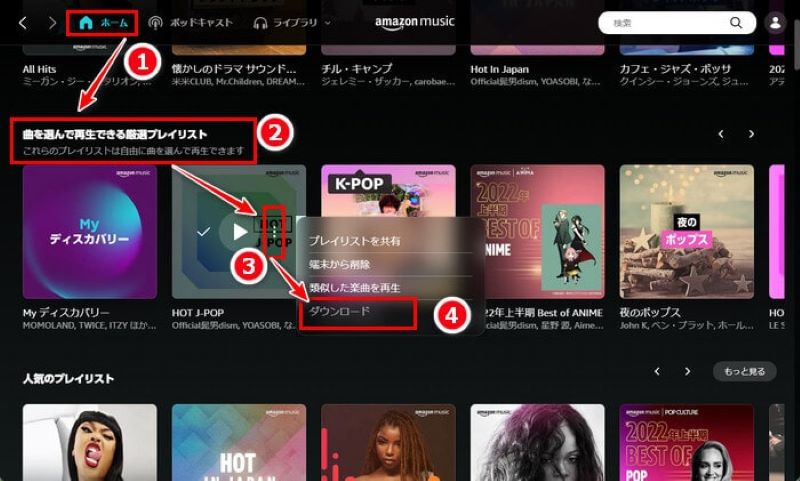
Due to a change in Amazon Music's specifications, Prime members can now download only "selective playlists" for offline playback. Also, the download function on Amazon Music Prime is limited to playlists, and individual songs cannot be downloaded from select playlists.
Follow the steps below to download curated playlists from Amazon Music Prime and play them offline.
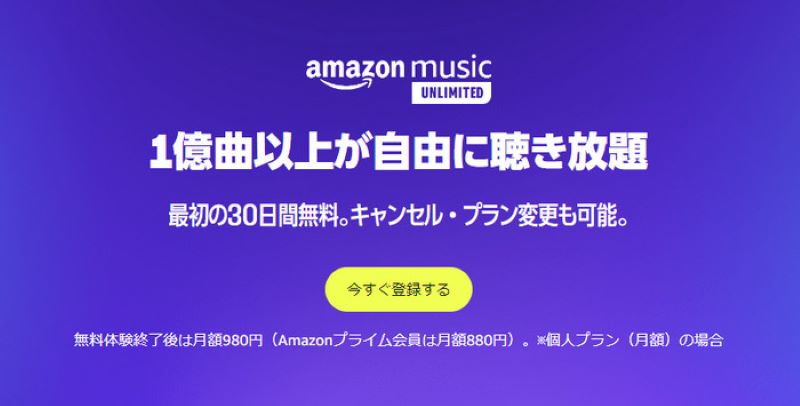
To download songs that are not included in the "Curated Playlist" on Amazon Music, you need to subscribe to the Unlimited plan. By subscribing to Amazon Music Unlimited, you can freely download your favorite songs, albums, and playlists and play them offline. You can also use features such as on-demand playback, skip playback, and seek bar operation without any restrictions.
If you subscribe to Amazon Music Unlimited but are unable to listen to downloaded music offline, signing in again to the Amazon Music app or re-authenticating your device may resolve the issue.
Tip
If you want to play Amazon Music songs offline without subscribing to Amazon Music Unlimited,StreamByte for MusicWe recommend using professional music download and conversion software such as ". Whether you have a Free plan or a Prime plan, you canDownload Amazon Music songs for freeYou can play it offline freely.
If you can't play Amazon Music offline due to an outdated app or OS, first update the app to the latest version from the Apple Store or Google Play and then try again. Alternatively, delete the app and reinstall it. If your OS version is outdated, update your device's OS itself to ensure the app works properly.
If you are unable to play Amazon Music offline due to insufficient storage space, free up space on your device by uninstalling unused apps and deleting unnecessary photos, videos, audio files, etc. Having sufficient storage space will allow the Amazon Music app to function properly and enable offline playback.
Also, if you don't care about high-quality playback, you can select the "Save Space" option when downloading songs from Amazon Music to save them in standard or low quality, thereby reducing the amount of storage space consumed.
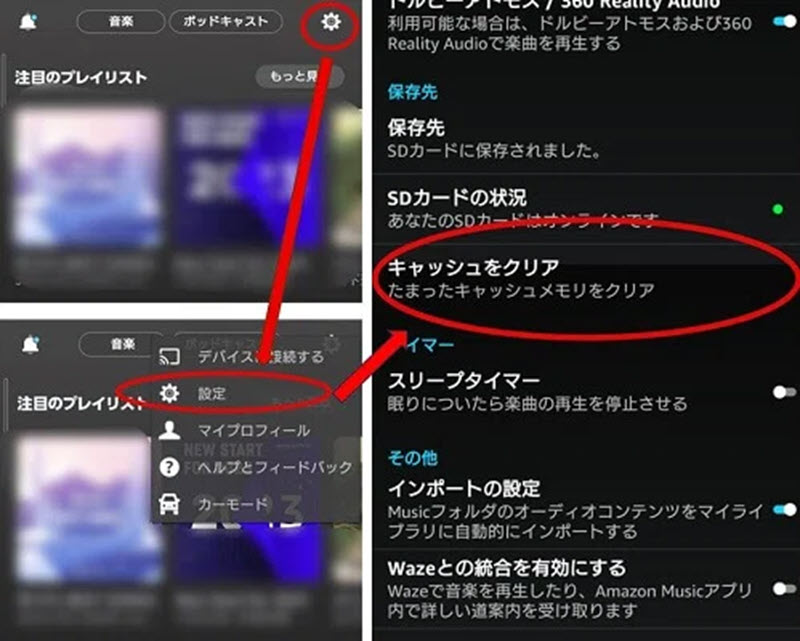
If you are unable to play offline due to a temporary problem on Amazon Music's side, unfortunately you will need to wait for Amazon to resolve the issue. The problem usually resolves in a short period of time, but if the issue persists for an extended period of time, we recommend contacting Amazon Music's support team and asking for assistance in resolving the issue.
Above we explained the reasons why Amazon Music cannot be played offline and how to fix it, but it takes some time to identify the specific reason why offline playback is not possible, and it may not always be possible to solve the problem.
So, as a fundamental solution to the problem of Amazon Music not being playable offline,StreamByte for MusicThis software is a dedicated tool that allows you to download music from multiple streaming services, including Amazon Music.Amazon Music Free, Prime, UnlimitedNo matter which plan you choose,Remove DRM protectionYou can download and save songs quickly and with high quality. This allows you to play and manage your saved music freely without being subject to Amazon Music's offline playback restrictions.
With "StreamByte for Music," you no longer have to worry about Amazon Music not being able to play offline. You can enjoy Amazon Music anytime, anywhere!
StreamByte for Music
This is the perfect music converter for those who want to enjoy streaming music with the original sound quality. It supports multiple music platforms and allows you to save music while maintaining high sound quality.
Features of "StreamByte for Music"
So, "StreamByte for MusicWe will show you how to download music from Amazon Music and play it offline using "Amazon Music Downloader".
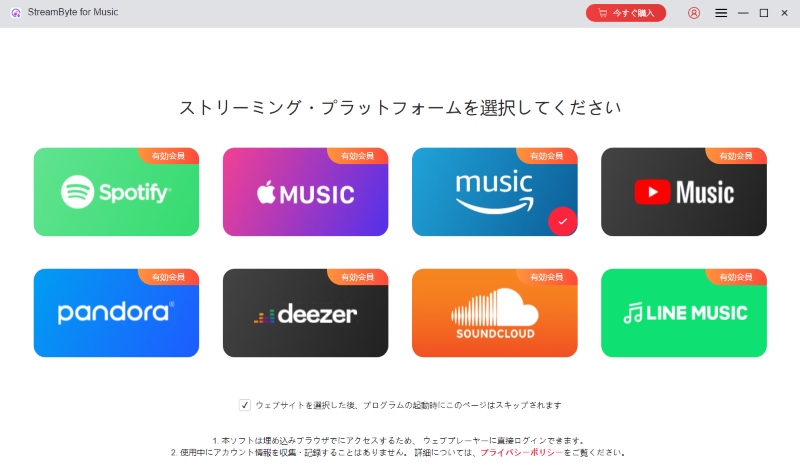
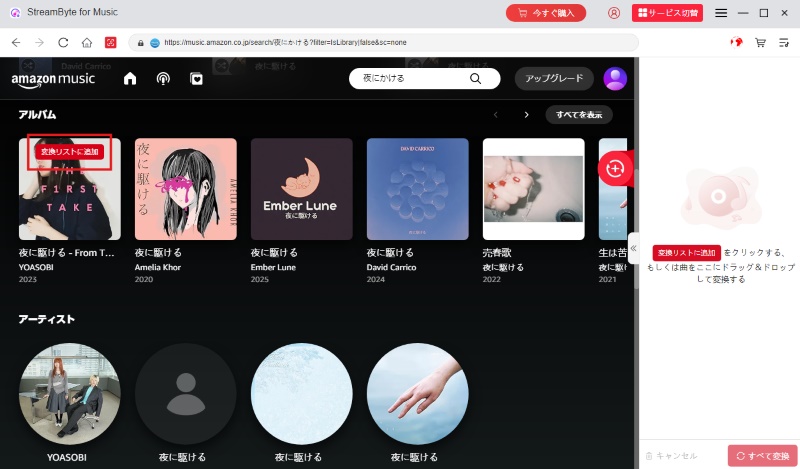
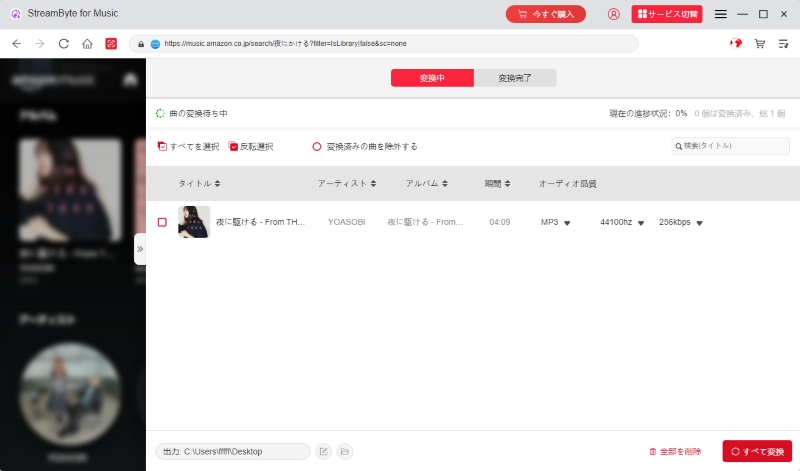
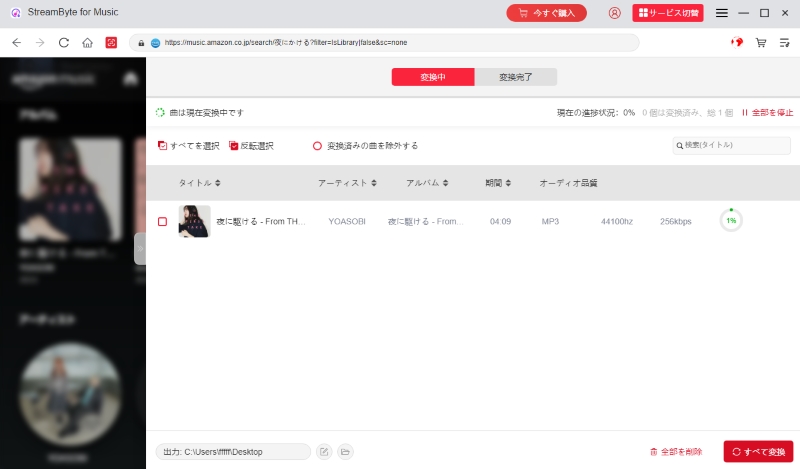
With the above steps, even beginners can easilyDownload Amazon Music to your PCYou can play it offline. The saved music can be saved in a versatile format such as MP3 while maintaining high sound quality, so it can be played on other music players. What's more, you can save music permanently without DRM protection, so you can enjoy Amazon Music anytime, anywhere! If you're having trouble playing Amazon Music offline no matter how many times you try, we recommend "StreamByte for Music"Please try it!
100% safe and virus free
100% safe and virus free
With Amazon Music Prime, in addition to downloading "Curated Playlists," you can create "My Premium Playlists," which contain 15 to 50 songs of your choice and play them in any order. These playlists can be played on demand, and you can create up to two, selecting and downloading up to 100 songs in total for offline playback. Amazon Music Unlimited has no functional limitations, allowing you to download any song, album, or playlist for offline playback. However, free Amazon Music users cannot access the offline playback feature, meaning they cannot save songs to their device for offline playback.
If you are a Prime member or free user and would like to enjoy Amazon Music offline without any restrictions, please click "StreamByte for MusicWe especially recommend using specialized music download software such as ".
100% safe and virus free
100% safe and virus free
Songs downloaded from Amazon Music are DRM-protected, so all saved songs can only be played through the Amazon Music app. Furthermore, these files are encrypted and cannot be moved freely to other devices. Furthermore, if you do not connect to the internet for a month, you may not be able to play these files offline. If you want to permanently save downloaded music without restrictions and manage it freely, we recommend using music download software " ," which can remove DRM protection from Amazon Music songs and convert them to formats such as MP3.StreamByte for Music" is recommended.
The main reasons why songs downloaded from Amazon Music cannot be played offline include "playback restrictions due to DRM protection," "old app version," "temporary problems on Amazon Music's side," and "download restrictions for Prime members."
First, downloaded songs are DRM-protected, so if you don't connect to the internet for a certain period of time (usually one month), the copyright protection mechanism may prevent offline playback. Furthermore, if you're using an older version of the Amazon Music app, it may not be able to correctly recognize encrypted music files, resulting in offline playback being disabled. Finally, there may be a temporary glitch on Amazon's server or license authentication system, in which case you'll need to wait until an official fix is released.
Please note that with the Amazon Music Prime plan, only "selected playlists" can be downloaded and played offline.Download Amazon Prime Music songs without restrictionsIf you want to download music, please consider using professional music download software.StreamByte for MusicBy using a music download tool like "Amazon Music Downloader," you can freely save your favorite songs and albums and play them offline, regardless of your Amazon Music plan.
StreamByte for Music
This is the perfect music converter for those who want to enjoy streaming music with the original sound quality. It supports multiple music platforms and allows you to save music while maintaining high sound quality.
In this article, we first explained the reasons why Amazon Music cannot be played offline. We then provided detailed solutions to these causes. However, there are still many people confused by the various reasons why Amazon Music cannot be played offline and the solutions. In addition, even if you try these solutions, the problem may not be resolved. Therefore, in order to solve all the problems at once, we will introduce a fundamental solution that allows you to download Amazon Music and play it offline - " StreamByte for Music" was introduced.
This software can fundamentally solve the problem of Amazon Music not being able to be played offline. Regardless of your Amazon Music plan, you can easily download your favorite songs, playlists, and albums in high quality.Play Amazon Music offlineYes, you can. What's more, downloaded songs can be converted to common formats such as MP3, so you can transfer them to any device and play them conveniently. You can enjoy the world of Amazon Music anytime, even when you're on the go or in a place without a network connection. If you're having trouble playing Amazon Music offline, be sure to try "Streambyte for Music"!
"StreamByte for Music"teeth
100% safe and virus free
100% safe and virus free
Born in Tokyo. Studied music culture at Tokyo Woman's Christian University, and after graduating, worked in the music distribution and download industry, gaining experience as an editor and writer. Has a deep understanding of a wide range of music genres, from rock, J-POP, classical, and metal, and is familiar with major services such as Spotify, Apple Music, and YouTube Music.
He has written over 300 articles, with a total of 6 million page views. He strives to provide accurate and easy-to-understand information so that readers can enjoy music more conveniently and safely. He currently writes articles for the StreamByte editorial department, focusing on how to use and utilize music download and conversion software.
Read more articles together
Experts in supporting offline listening of streaming music services
Subscribe to StreamByteCopyright © 2026 StreamByte. All rights reserved.



Get the latest news, product upgrades, information, guides, discounts and more about StreamByte.
Please enter a valid email address.





 English
  Japanese
  Chinese (traditional)
  German